关于页面的几个说明
HTML5 Shiv
由于Schema.org微数据是基于HTML5微数据的规范,HTML5的标记被用来创建一页简历的网站模板。不幸的是,旧的网页浏览器如IE7和IE8不承认某些HTML5元素。在这些旧的浏览器中,使用HTML5编写的页面将无法正确呈现。
当在IE8里点击图片查看全图时,下面是在线简历示例的截图:
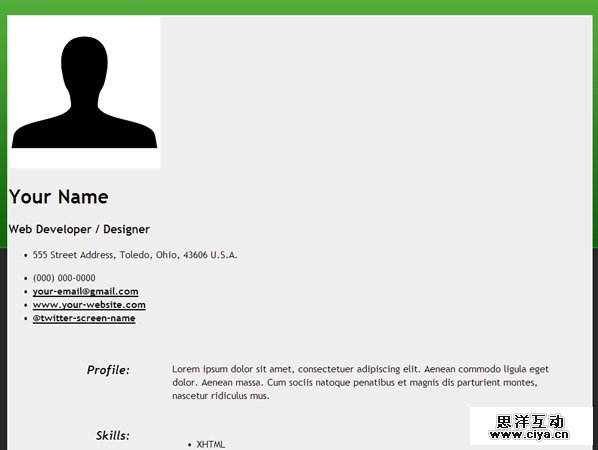
为了解决这些旧IE浏览器版本的问题,在标签间添加了如下的代码(在CSS样式表下面):
- <!--[if lt IE 9]>
- <script src="http://html5shiv.googlecode.com/svn/trunk/html5.js"></script>
- <![endif]-->
此代码是一个HTML5 JavaScript shim,用于让IE识别和渲染HTML5元素。
注:在IE9和其他现代浏览器中不需要使用HTML5 JavaScript shim。
定义列表
我们在标记中使用<dd></dd>而不是无序列表来定义列表。这是因为当考虑到每个项目都有一个标题和描述时更有意义。
Section vs Article
关于HTML5的Section和Article元素的使用似乎有一些混乱。我们在页面中使用Section元素,因为没有简历的段落是独立的内容。HTML5的Article元素被用在独立的内容上,例如博客文章或新闻报道。本文很好的解释了HTML5 Section和Acricle元素之间的差异 。
广州网站建设,网站建设,广州网页设计,广州网站设计
第三步:添加Schema.org微数据-Person和PostalAddress
我们首先要添加的模式类型是Person和PostalAddress。
Itemscope元素和ItemType属性
我们将一个itemscope元素添加到<div></div>标签上。
- <div itemscope itemtype="http://schema.org/Person">
- Content that contains information about a Person
- </div>
Itemscope元素和Person模式的ItemType 属性都将被放在简历页面联系方式和社会化媒体链接的部分,像如下所示:
- <!-- Begin Contact Section -->
- <section id="contact-details">
- <div itemscope itemtype="http://schema.org/Person">
- Rest of Code Block Here
- </div>
- </section>
- <!-- End Contact Section -->
- <!-- Begin Social Media and Download Links -->
- <div itemscope itemtype="http://schema.org/Person">
- Rest of Code Block Here
- </div>
- <!-- End Social Media and Download Links -->
itemscope元素和PostalAddress模式的ItemType属性被嵌入Person模式中,包含地址信息放在无序的列表<ul></ul>中:
- <!-- Begin PostalAddress Schema -->
- <div itemprop="address" itemscope itemtype="http://schema.org/PostalAddress">
- <ul class="info_1">
- <li class="address"><span itemprop="streetAddress">555 Street Address</span>, <span itemprop="addressLocality"<Toledo</span>, <span itemprop="addressRegion">Ohio</span>, <span itemprop="postalCode"<43606</span> <span itemprop="addressCountry">U.S.A.</span></li>
- </ul>
- </div>
- <!-- End PostalAddress Schema -->
Itemprop属性
需要把Itemprop属性添加到适当的span标记中,以便对搜索引擎提供我们网页的附加信息。下面是我们将使用这些模式的属性 :
Person模式
◆ itemprop="image"
◆ itemprop="name"
◆ itemprop="jobTitle"
◆ itemprop="telephone"
◆ itemprop="email"
◆ itemprop="url"
PostalAddress架构
◆ itemprop="streetAddress"
◆ itemprop="addressLocality"
◆ itemprop="addressRegion"
◆ itemprop="postalCode"
◆ itemprop="addressCountry"
联系人和社会化媒体链接段落的最终页面
- <!-- Begin Contact Section -->
- <section id="contact-details">
- <div itemscope itemtype="http://schema.org/Person">
- <!-- Begin Profile Image Section -->
- <div class="header_1">
- <img src="images/profile.jpg" itemprop="image" width="250" height="250" alt="Your Name" />
- </div>
- <!-- End Profile Image Section -->
- <!-- Begin Profile Information Section -->
- <div class="header_2">
- <h1><span itemprop="name">Your Name</span></h1>
- <h3><span itemprop="jobTitle">Web Developer / Designer</span></h3>
- <!-- Begin PostalAddress Schema -->
- <div itemprop="address" itemscope itemtype="http://schema.org/PostalAddress">
- <ul class="info_1">
- <li class="address"><span itemprop="streetAddress">555 Street Address</span>, <span itemprop="addressLocality"<Toledo</span>, <span itemprop="addressRegion">Ohio</span>, <span itemprop="postalCode"<43606</span> <span itemprop="addressCountry">U.S.A.</span></li>
- </ul>
- </div>
- <!-- End PostalAddress Schema -->
- <ul class="info_2">
- <li class="phone"><span itemprop="telephone">(000) 000-0000</span></li>
- <li class="email"><a href="mailto:your-email@gmail.com" itemprop="email">your-email@gmail.com</a></li>
- <li class="site_url"><a rel="me" itemprop="url" href="http://www.webcodepro.net/about.php" title="www.your-website.com">www.your-website.com</a></li>
- <li class="twitter"><a rel="me" itemprop="url" href="http://twitter.com/twitter-screen-name" title="Follow Me on Twitter">@twitter-screen-name</a></li>
- </ul>
- </div>
- <!-- End Profile Information Section -->
- </div>
- </section>
- <!-- End Contact Section -->
- <!-- Begin Social Media and Download Links -->
- <div itemscope itemtype="http://schema.org/Person">
- <ul class="icons_1">
- <li><a rel="author" itemprop="url" href="https://profiles.google.com/jwagner719" title="Google Profile"><img src="http://www.google.com/images/icons/ui/gprofile_button-32.png" width="32" height="32" alt="Google Profile"></a></li>
- <li><a rel="me" itemprop="url" href="http://dribbble.com/" title="Dribbble"><img src="images/dribbble.png" width="32" height="32" alt="Dribbble" /></a></li>
- <li><a rel="me" itemprop="url" href="http://www.linkedin.com/" title="LinkedIn"><img src="images/linkedin.png" width="32" height="32" alt="LinkedIn" /></a></li>
- <li><a rel="me" itemprop="url" href="http://www.facebook.com/" title="Facebook"><img src="images/facebook.png" width="32" height="32" alt="Facebook" /></a></li>
- <li><a rel="me" itemprop="url" href="http://www.flickr.com/" title="Flickr"><img src="images/flickr.png" width="32" height="32" alt="Flickr" /></a></li>
- <li><a rel="me" itemprop="url" href="http://twitter.com/" title="Follow Me on Twitter!"><img src="images/twitter.png" width="32" height="32" alt="Follow Me on Twitter!" /></a></li>
- </ul>
- <ul class="icons_2">
- <li><a href="resume.pdf" title="Download Resume PDF"><img src="images/download.png" width="48" height="48" alt="Download Resume PDF" /></a></li>
- </ul>
- </div>
- <!-- End Social Media and Download Links -->