我们对content_a应用向左的浮动。而content_b不应用任何浮动。
SourceCodetoRun
- "http://www.w3.org/TR/xhtml1/DTD/xhtml1-transitional.dtd">
- <htmlxmlnshtmlxmlns="http://www.w3.org/1999/xhtml">
- <head>
- <metahttp-equivmetahttp-equiv="Content-Type"content="text/html;
- charset=gb2312"/>
- <title>52CSStitle>
- <styletypestyletype="text/css">
- #content_a{width:200px;height:80px;float:left;border:1pxsolid#000;
- margin:10px;background:#ccc;}
- #content_b{width:200px;height:80px;border:1pxsolid#000;margin:10px;
- background:#999;}
- style>
- head>
- <body>
- <dividdivid="content_a">52CSS.com这是第一个DIV向左浮动div>
- <dividdivid="content_b">52CSS.com这是第二个DIV不应用浮动div>
- body>
- html>
[可先修改部分代码再运行查看效果]
我们看在IE6中的效果:
广州网站建设,网站建设,广州网页设计,广州网站设计

我们看在Firefox中的效果:
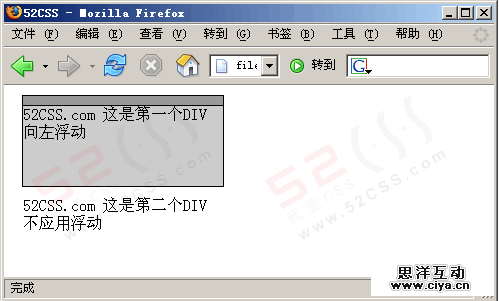
在IE中,对content_a应用向左的浮动后,content_a向左浮动,content_b在水平方向仅跟着它的后面。
在Firefox中,对content_a应用向左的浮动后,content_b在水平方向容器不可见,只留下了文字。这是由于未清除浮动所造成的现象,关于清除浮动,可以参考这里:http://www.52css.com/article.asp?id=132这就是IE与Firefox对此种情况的不同解决,我们在实际布局中,应该避免这样的情况发生。
广州网站建设,网站建设,广州网页设计,广州网站设计