步骤3 设计CSS
将CSS的名称命名为demo.css,代码如下:
广州网站建设,网站建设,广州网页设计,广州网站设计
- body,h1,h2,h3,p,td,quote,small,form,input,ul,li,ol,label{...}{
- /**//* 为某些浏览器兼容性而设计 */
- margin:0px;
- padding:0px;
- font-family:Arial, Helvetica, sans-serif;
- }
- body{...}{
- color:#555555;
- font-size:13px;
- background-color:#282828;
- }
- .clear{...}{
- clear:both;
- }
- #main-container{...}{ /**//* 页面中主层的宽度和边距设置*/
- width:700px;
- margin:20px auto;
- }
- .container{...}{ /**//* 商品列表层和购物车区域的div设置 */
- margin-bottom:40px;
- }
- .top-label{...}{ /**//* 这是页面上部products的样式*/
- background:url(img/label_bg.png) no-repeat;
- display:inline-block;
- margin-left:20px;
- position:relative;
- margin-bottom:-15px;
- }
- .label-txt{...}{
- background:url(img/label_bg.png) no-repeat top right;
- display:inline-block;
- font-size:10px;
- height:36px;
- margin-left:10px;
- padding:12px 15px 0 5px;
- text-transform:uppercase;
- }
- .content-area{...}{ /**//* content-area区域的样式 */
- background:url(img/container_top.png) no-repeat #fcfcfc;
- padding:15px 20px 0 20px;
- }
- .content{...}{
- padding:10px;
- }
- .drag-desired{...}{ /**//* 商品列表区域的样式*/
- background:url(img/drag_desired_label.png) no-repeat top right;
- padding:30px;
- }
- .drop-here{...}{ /**//*购物车区域的样式 */
- background:url(img/drop_here_label.png) no-repeat top right;
- }
- .bottom-container-border{...}{
- background:url(img/container_bottom.png) no-repeat;
- height:14px;
- }
- .product{...}{ /**//* 商品的样式 */
- border:2px solid #F5F5F5;
- float:left;
- margin:15px;
- padding:10px;
- }
- .product img{...}{
- cursor:move;
- }
- p.descr{...}{
- padding:5px 0;
- }
- small{...}{
- display:block;
- margin-top:4px;
- }
- .tooltip{...}{ /**//* 商品的简单介绍用到的样式,这个样式jQuery 的simpletip plugin插件会用到 */
- position: absolute;
- top: 0;
- left: 0;
- z-index: 3;
- display: none;
- background-color:#666666;
- border:1px solid #666666;
- color:#fcfcfc;
- padding:10px;
- -moz-border-radius:12px; /**//* 圆角效果*/
- -khtml-border-radius: 12px;
- -webkit-border-radius: 12px;
- border-radius:12px;
- }
以上的样式中给出了关键部分的注释,其中注意的是使用了CSS3中的圆角效果样式border-radius,接下来再看剩余的其他样式部分:
广州网站建设,网站建设,广州网页设计,广州网站设计
- #cart-icon{...}{ /**//* 购物篮的样式 */
- width:128px;
- float:left;
- position:relative;
- }
- #ajax-loader{...}{
- position:absolute; /**//* 这是等待加载的图标的样式*/
- top:0px;
- left:0px;
- visibility:hidden;
- }
- #item-list{...}{ /**//* 购物篮中已放置的商品的样式*/
- float:left;
- width:490px;
- margin-left:20px;
- padding-top:15px;
- }
- a.remove,a.remove:visited{...}{ /**//* 移除购物车中商品的链接的样式 */
- color:red;
- font-size:10px;
- text-transform:uppercase;
- }
- #total{...}{ /**//* 总计的样式*/
- clear:both;
- float:right;
- font-size:10px;
- font-weight:bold;
- padding:10px 12px;
- text-transform:uppercase;
- }
- #item-list table{...}{
- background-color:#F7F7F7;
- border:1px solid #EFEFEF;
- margin-top:5px;
- padding:4px;
- }
- a.button,a.button:visited{...}{ /**//* 结算按钮*/
- display:none;
- height:29px;
- width:136px;
- padding-top:15px;
- margin:0 auto;
- overflow:hidden;
- color:white;
- font-size:12px;
- font-weight:bold;
- text-align:center;
- text-transform:uppercase;
- background:url(img/button.png) no-repeat center top;
- }
- a.button:hover{...}{
- background-position:bottom;
- text-decoration:none;
- }
为了兼容IE 6浏览器,我们特别添加如下的CSS样式代码,以让IE 6支持PNG下背景透明的特性:
- <!--[if lt IE 7]>
- <style type="text/css">
- .pngfix { behavior: url(pngfix/iepngfix.htc);}
- .tooltip{width:200px;}; /*为商品的介绍设置默认的宽度 */
- </style>
- <![endif]-->
将其中的iepngfix.htc和blank.gif解压缩到合适的目录内,.htc即Html Components,该文件需要在CSS中被调用;blank.gif是一个1×1像素的透明GIF图片。
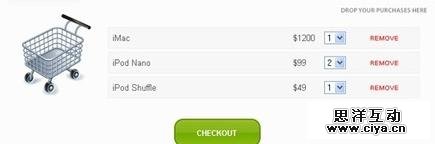
最后,我们的页面效果做出来应该是这样的: